Automated Inventory Tracking Program: How to Manage Salon Stock More Efficiently
blog
•Nov 13, 2026
•19 min read
Table of contents


Quick answer: Automated inventory tracking for salons replaces handwritten notes and disconnected spreadsheets with one centralized digital process. You register products, record purchases and stock arrivals, monitor product usage and sales, watch stock levels with low-stock alerts, and compare your records with regular physical stock counts.
Overview
- What is an inventory management system?
- Backbar vs retail inventory
- Where salons lose money without inventory tracking
- Why accurate inventory tracking is important
- How an automated inventory tracking system works (5 steps)
- Key benefits for salons
- Inventory valuation and control concepts (FIFO, FEFO, weighted average cost, perpetual inventory, just-in-time)
- Traditional vs modern inventory management
- Best practices for managing salon inventory efficiently
- How to choose salon inventory management software
- How Chairlyo helps salons manage inventory
- A 7-day setup plan
- FAQs
Managing salon inventory is more than simply keeping products on shelves. It involves monitoring product quantities, recording purchases, tracking product usage, managing stock levels, and ensuring that essential supplies are available whenever customers need them.
For salon and spa owners, maintaining accurate inventory records can become challenging when everything is handled manually. This is where an automated inventory tracking system becomes valuable. By digitizing inventory operations, salons can maintain organized product records, monitor stock movement, reduce manual errors, and make better purchasing decisions.
In this guide, we will explore how automated inventory tracking tools work, its essential concepts, the differences between traditional and modern inventory management, and how Chairlyo helps salons organize their product inventory. You will also learn the difference between backbar and retail stock, where salons quietly lose money, how to calculate a reorder point, and what to look for when choosing salon inventory management software.
What Is an Inventory Management System?
An inventory management system is a software-based solution that helps businesses monitor, organize, and control their stock throughout its lifecycle. The process begins when a business purchases products from suppliers and continues through receiving, storing, using, and selling those products.
An inventory management system helps business owners understand what products are available, which products are being used frequently, and when additional stock needs to be purchased.
In a salon or spa, salon inventory management usually covers two kinds of stock: backbar products that stylists and therapists use during services, and retail products that are sold to customers. It also helps prevent two common inventory problems:
- Overstocking: Purchasing or storing more products than the business needs. This can increase storage expenses, tie up working capital, and create the risk of product expiration. For example, a salon that buys a year’s supply of a treatment with a short shelf life may end up throwing part of it away.
- Understocking: Having insufficient products to meet customer demand. This can interrupt salon services, delay appointments, and create an unpleasant customer experience. For example, running out of a stylist’s regular shampoo or color shade in the middle of a busy Saturday.
The objective is to maintain an appropriate balance between available stock and actual business requirements.
Backbar vs Retail Inventory: The Difference Every Salon Owner Should Know
Most generic inventory guides ignore this, but it is the most important concept in salon stock control.
- Backbar inventory is the professional product used during services: shampoo, color, developer, treatments, nail products, and similar supplies. It is a cost of delivering the service, so it affects your cost per service and your service margin.
- Retail inventory is the product you sell to customers at checkout. It is stock held for sale, so it affects retail revenue, gross profit, and sales reporting.
When the two are mixed in one pool, owners cannot tell how much product each service really consumes or how profitable retail really is. Products also move between the two: a retail bottle may be pulled into the backbar, or an opened backbar item may be sold. Record those movements instead of letting them disappear.
Where Salons Lose Money Without Inventory Tracking
Inventory loss in a salon is rarely dramatic. It is usually small, repeated, and unrecorded.
- Over-pouring and inconsistent usage. Stylists mix a little extra “just in case,” or remake a bowl that was too large. Without product usage tracking, owners cannot see where service costs are rising.
- Shrinkage and missing products. Products move between stations, retail items get pulled into the backbar, and bottles go missing on busy days. Counts stop matching the shelf, and staff stop trusting the numbers.
- Stockouts and service interruptions. Running out of a key product pauses services, forces substitutions, and delays appointments.
- Dead stock and expired products. Reordering by habit leaves products in drawers until they expire, which ties up cash.
- Unrecorded usage and sales. Missing even one transaction creates a gap between recorded and actual stock.
- Forecasting by memory. Without usage data, seasonal peaks such as festival and wedding seasons are hard to plan for, which leads to overordering or underordering.
A simple cost-per-service example (illustrative numbers): Suppose a 60 g tube of hair color costs 900 currency units, so each gram costs 15. A service planned for 45 g costs 675 in product. If stylists regularly pour 60 g, the same service costs 900, an extra 225 per service. Across 20 such services in a month, that is 4,500 of product cost that never appears in a notebook. Tracking usage makes this visible.
Why Is Accurate Inventory Tracking Important?
Inventory record inaccuracy occurs when the quantity recorded in a system does not match the actual physical quantity available.
A study published in Management Science by Nicole DeHoratius and Ananth Raman (2008) examined nearly 370,000 inventory records across 37 stores of one retailer. The researchers found that 65% of the examined records were inaccurate.
Although this research focused on retail stores rather than salons, it demonstrates how inventory discrepancies can become a significant operational challenge. Accurate tracking, regular stock audits, and consistent recording practices help reduce these discrepancies.
How Does an Automated Inventory Tracking System Work?
An automated inventory tracking system replaces disconnected manual records with a centralized digital process.
Instead of relying entirely on spreadsheets or handwritten notes, salon owners and employees can use software to record product information and monitor stock movement.
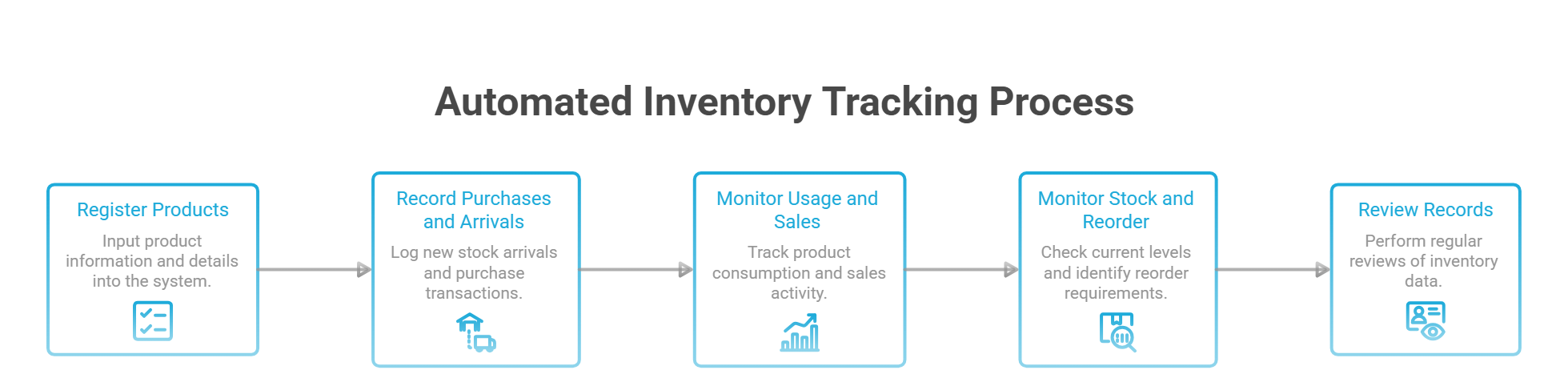
Here is how the process generally works:
1. Register Products and Their Details
The first step is to enter the products into the inventory system, it require to distinguished according to their respective categories and record the items.
Each product should have relevant information, including:
- Product name.
- Product category (and whether it is backbar or retail).
- Stock quantity.
- Purchase cost.
- Selling price, where applicable.
- Supplier information.
- Unit of measure, so quantities are consistent.
- Expiry date, where applicable.
- Product identification details, such as SKU or barcode, where supported.
2. Record Purchases and Stock Arrivals
Whenever a salon purchases additional products, the received quantities should be recorded in the inventory system.
For example, if a salon has 10 bottles of shampoo and purchases another 15 bottles, the updated stock quantity becomes 25.
Recording purchases consistently helps maintain accurate stock information and provides a clearer understanding of purchasing activities. Record the purchase cost at the same time, so your inventory value and product costs stay accurate even when supplier prices change.
3. Monitor Product Usage and Sales
Inventory tracking should not stop after products are added. Salon owners also need to monitor how products are consumed during customer services and how retail products are sold.
For example, when a stylist uses a hair treatment product during a customer appointment, the salon should record that usage according to its inventory procedure.
Similarly, when a customer purchases a retail shampoo at checkout, the corresponding stock quantity should be updated where inventory and POS systems are integrated. Updating retail sales can update the same inventory records, reducing duplicate data entry.
4. Monitor Stock Levels and Reorder Requirements
A business needs to know when its products are running low. A reorder point is the stock level at which a business should consider purchasing additional products before running out.
With the implementation of the system, low-stock alerts can notify the employees when a product reaches its defined reorder threshold. This helps salon owners plan purchases instead of waiting until essential products are unavailable.
5. Review Inventory Records Regularly
Even automated systems require proper monitoring. Regular physical stock counts help businesses compare actual quantities with the quantities recorded in their software.
If differences occur, owners can investigate possible reasons, such as:
- Unrecorded product usage.
- Incorrect purchase entries.
- Damaged or expired products.
- Unrecorded retail sales.
- Missing or misplaced items.
Key Benefits of Automated Inventory Tracking for Salons
Essential and valuable objective of an automated inventory operations based on the foundation which to improve daily the performance of salon management in several ways.
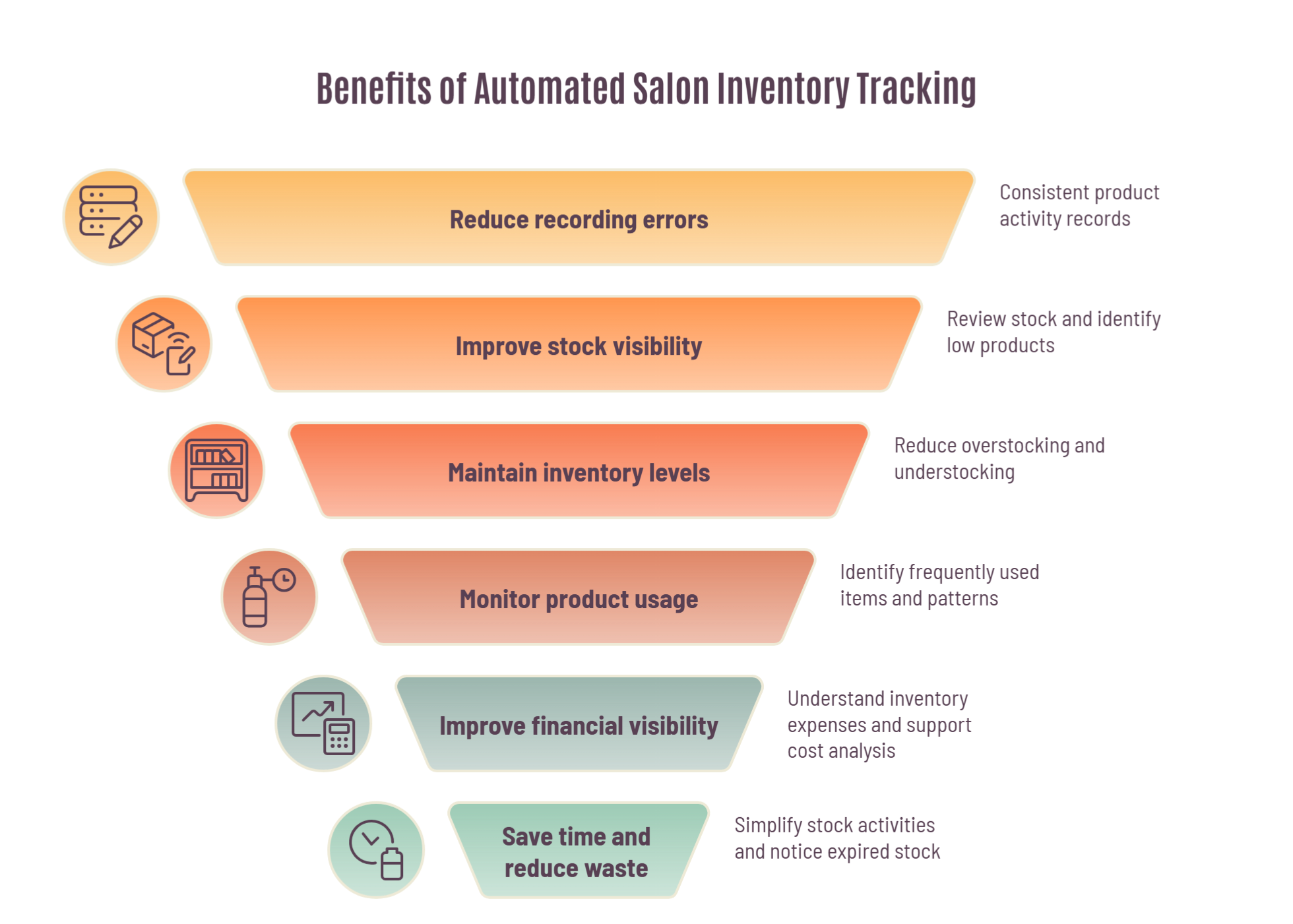
1. Reduces Manual Recording Errors
Manual inventory management requires employees to update stock records whenever products are purchased, used, or sold. Missing even a single transaction can create discrepancies between actual stock and recorded quantities. A centralized inventory system provides a consistent place to record product activities, reducing reliance on separate spreadsheets and notebooks.
2. Improves Stock Visibility
Salon owners need to understand which products are available and which ones require replenishment. Digital inventory records make it easier to review stock information and identify products that are running low. This visibility helps businesses make informed purchasing decisions.
3. Helps Reduce Overstocking and Understocking
Maintaining excessive stock can increase storage expenses and the possibility of wastage. On the other hand, insufficient stock can interrupt customer services. Monitoring stock movement and purchasing requirements helps salons maintain more appropriate inventory levels.
4. Supports Better Product Usage Monitoring
Salons often use professional products during customer appointments. Without proper recording, owners may find it difficult to understand how much product is being consumed. Monitoring usage helps businesses identify frequently used items, review consumption patterns, and plan future purchases.
5. Improves Financial Visibility
Inventory represents money invested in products and supplies. By recording purchase costs, sales values, and product quantities, salon owners can better understand their inventory expenses. This information also supports cost analysis, gross profit calculations, and purchasing decisions.
6. Saves Time for Salon Employees
Employees should spend more time serving customers rather than maintaining multiple manual records. A well-organized inventory system simplifies routine stock activities and helps staff access product information more conveniently.
7. Reduces Waste, Shrinkage and Expired Stock
When usage, adjustments, and expiry dates are recorded, it becomes easier to notice over-pouring, missing items, and products that should be used first.
8. Supports Cost-per-Service and Pricing Decisions
Knowing what each service consumes in a product helps owners check whether the service menu and prices still protect their margin.
Important Inventory Management Concepts Every Salon Owner Should Understand
To manage inventory effectively, salon owners should understand a few essential concepts related to inventory valuation, stock control, and replenishment.
1. Inventory Valuation Methods: FIFO and Weighted Average Cost
Inventory valuation refers to the method used to determine the financial value of products held in stock.
Two commonly used inventory cost formulas are FIFO and Weighted Average Cost.
FIFO (First-In, First-Out)
FIFO assumes that the products purchased or received first are sold or used first. This approach is particularly useful when salons handle products that have expiration dates because older stock can be prioritized for use.
Weighted Average Cost (WAC)
Weighted Average Cost calculates the average cost of similar inventory items based on their quantities and purchase costs. Instead of tracking the cost of each individual unit separately, the business calculates an average cost per unit.
The formula is: Weighted Average Cost per Unit = Total Cost of Inventory ÷ Total Number of Units
Example (illustrative): a salon holds 10 bottles bought at 400 each (4,000) and buys 15 more at 480 each (7,200). Total cost is 11,200 across 25 bottles, so the weighted average cost is 11,200 ÷ 25 = 448 per bottle.
WAC is useful when businesses purchase similar products at different prices and want a consistent basis for calculating inventory costs.
FIFO vs FEFO for products with expiry dates
FIFO is the costing assumption above, and it is also how many people describe stock rotation. For products that expire, the safer shelf rule is FEFO (first-expired, first-out): use the product that expires soonest, even if it arrived later.
2. Inventory Control Systems: Perpetual Inventory and Just-in-Time
Inventory control refers to the procedures businesses use to maintain appropriate stock levels and monitor inventory movement. Two important approaches are perpetual inventory tracking and Just-in-Time inventory management.
Perpetual Inventory System
A perpetual inventory system continuously updates inventory records whenever a purchase, sale, or other stock movement is recorded. This approach provides more up-to-date inventory information than relying only on periodic physical stock counts.
Just-in-Time (JIT) Inventory Management
Just-in-Time is an inventory approach in which products are purchased or replenished according to demand and operational requirements. Instead of maintaining unnecessarily large quantities, businesses aim to receive products when they are needed.
JIT can reduce storage costs and product wastage. However, it requires reliable suppliers, accurate demand planning, and careful monitoring because delayed deliveries can lead to shortages. For most salons, a lean version works best: keep a small safety buffer of essential backbar products and reorder against a defined reorder point.
3. Par Level and Safety Stock
A par level is the quantity you want on hand for a product at the start of a cycle. Safety stock is the extra buffer that protects you from late deliveries or unexpected demand. Together with the reorder point, they turn “order when it feels low” into a rule.
Traditional vs. Modern Inventory Management
Traditional and modern inventory management differ mainly in how stock information is recorded, monitored, and used for decision-making.
Traditional Inventory Management | Modern Inventory Management | What it means for a Salon |
Relies heavily on notebooks, spreadsheets, and manual records | Uses digital inventory management software | One place for product records instead of scattered files |
Stock information may require manual updates | Records can be updated when transactions are entered | Fewer gaps between what is recorded and what is on the shelf |
Physical stock counts are often the main way to identify discrepancies | Digital records can be supported by regular physical audits | Problems are caught earlier and investigated faster |
Employees may have difficulty identifying low-stock products quickly | Stock-level monitoring and alerts can support replenishment | Fewer surprise stockouts in the middle of a service day |
Product usage and sales records may be maintained separately | Integrated systems can connect inventory with POS transactions | Less duplicate entry at checkout |
Purchasing decisions often depend on previous experience | Purchasing decisions can be supported by inventory and sales data | Orders based on actual usage, not guesswork |
Modern inventory management does not eliminate the need for physical stock checks. Instead, it combines digital records with regular verification to improve accuracy and visibility.
Best Practices for Managing Salon Inventory Efficiently
Choosing inventory management software is only one part of successful organizing, storing and recording items. Businesses also need consistent procedures to maintain reliable records.
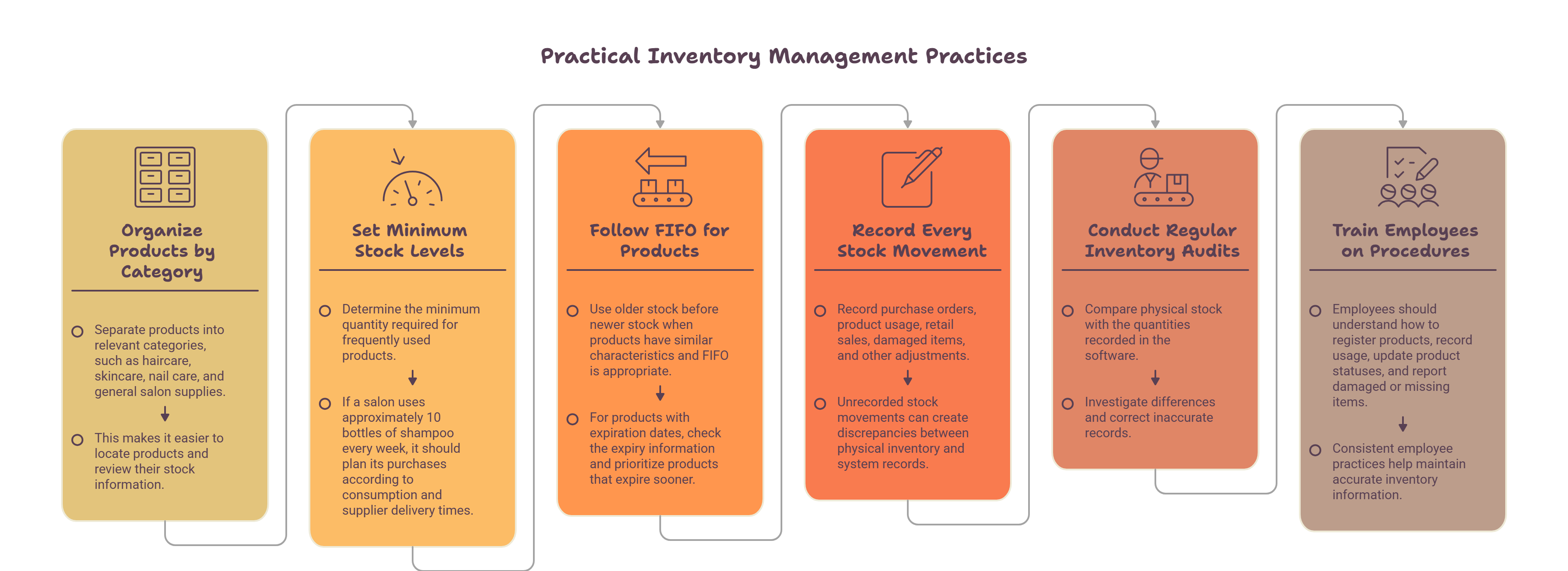
Here are some practical inventory management practices:
- Organize Products by Category. Separate products into relevant categories, such as haircare, skincare, nail care, and general salon supplies. This makes it easier to locate products and review their stock information.
- Set Minimum Stock Levels. Determine the minimum quantity required for frequently used products. For example, if a salon uses approximately 10 bottles of shampoo every week, it should plan its purchases according to consumption and supplier delivery times.
- Follow FIFO for Suitable Products. Use older stock before newer stock when products have similar characteristics and FIFO is appropriate. For products with expiration dates, check the expiry information and prioritize products that expire sooner (FEFO).
- Record Every Stock Movement. Record purchase orders, product usage, retail sales, damaged items, and other adjustments. Unrecorded stock movements can create discrepancies between physical inventory and system records.
- Conduct Regular Inventory Audits. Compare physical stock with the quantities recorded in the software. Investigate differences and correct inaccurate records.
- Train Employees on Inventory Procedures. Employees should understand how to register products, record usage, update product statuses, and report damaged or missing items. Consistent employee practices help maintain accurate inventory information.
- Keep Backbar and Retail Separate. Track them as different stock types so cost per service and retail profit stay clear.
- Standardize Units and Names. Use one unit of measure per product and one naming format, and merge duplicate product profiles during a quarterly clean-up.
- Use Standard Adjustment Reasons. For example: waste, tester, damaged, expired, transfer, returned to supplier.
Here, after acquiring the knowledge of practical approach helps to flourished any business apart from that raised concern about choosing the right inventory system. With an ease a reliable platform where you can significantly operate your salon and spa more effectively and seamlessly.
How Chairlyo Helps Salons Manage Inventory
Managing salon products manually can become increasingly difficult as the business grows. Here, actually how Chairlyo provides an inventory management workflow that helps salons organize product records and monitor the usage of individual product containers. Here is how the process works:
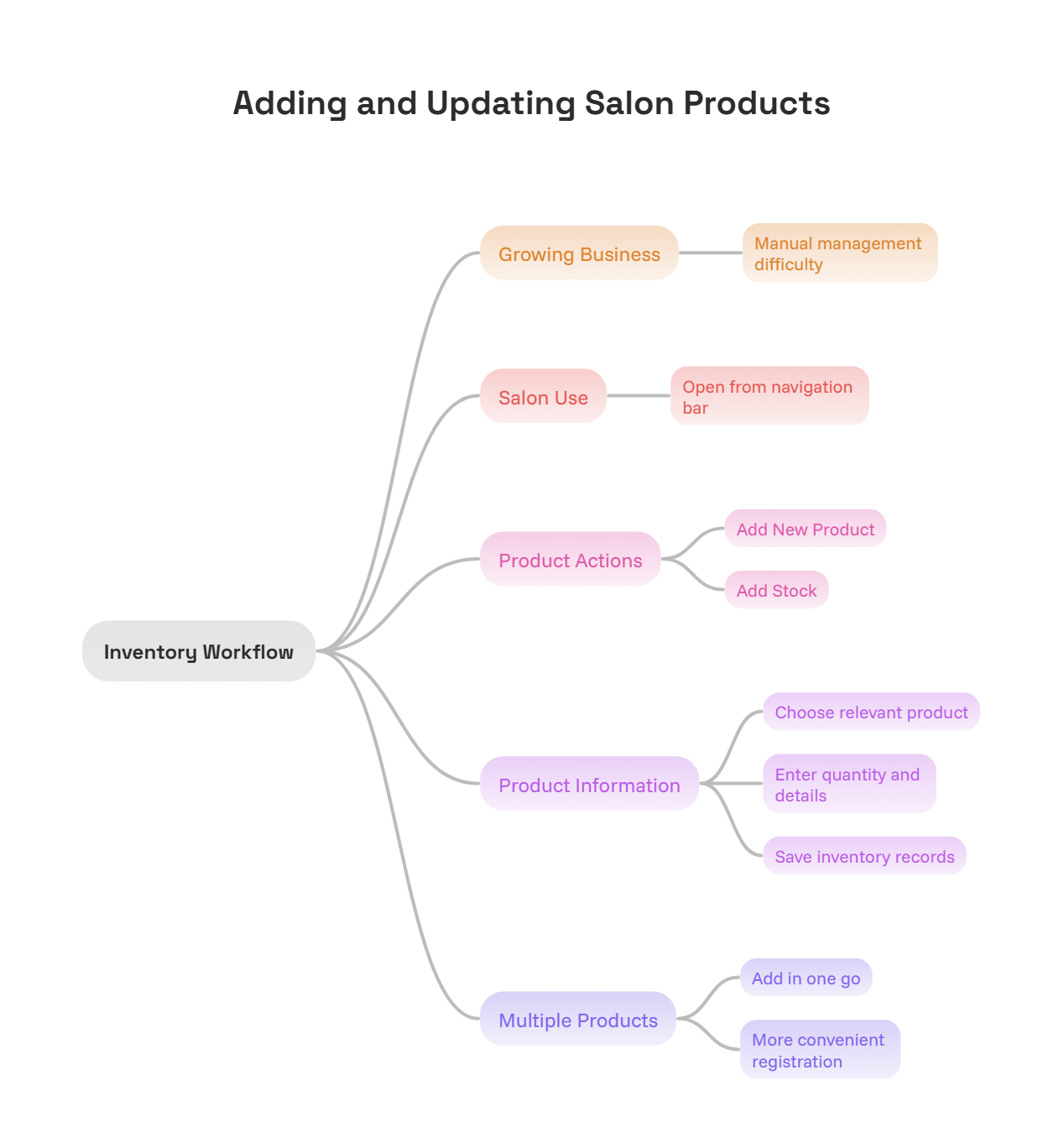
Step 1: Add New Products or Update Existing Stock
Open the Salon Use section from the navigation bar.
You can then:
- Select Add New Product to register a new product.
- Select Add Stock to increase the quantity of an existing product.
Choose the relevant product and enter the required information, including quantity and other product details. Save the information to update the inventory records.
Chairlyo also allows multiple products to be added in one go, making product registration more convenient.
Step 2: Product Status: Sealed
After products are added, each individual container appears separately in the stock list with the status Sealed.
This indicates that the container has not yet been opened for use. Maintaining individual container records helps employees identify the status of each product rather than treating all containers as one undifferentiated stock quantity.
Step 3: Product Status: Open
When a stylist starts using a particular product container during a customer session, they change its status from Sealed to Open using the status dropdown. Chairlyo’s workflow requires employees to open only one container of the same product at a time. This helps prevent multiple containers from being opened unnecessarily.
Step 4: Product Status: Completed
Once a product container has been fully used, the stylist changes its status from Open to Completed using the dropdown.
If a stylist attempts to open another container of the same product while an existing container is still marked Open, the system displays an alert asking whether the previous container has been finished and requests a reason for opening another one.
This process encourages employees to follow a consistent product usage procedure and helps salon owners maintain better visibility into individual container usage.
Why container-level tracking works: each container has a clear life: Sealed, then Open, then Completed. Because only one container of a product is open at a time, you can see how quickly a container is finished and spot unnecessary openings, without weighing every pour.
A 7-Day Plan to Move from Spreadsheets to Automated Inventory Tracking
- Day 1: Do a full physical count of backbar and retail products.
- Day 2: Decide categories, units of measure, and a naming format.
- Day 3: Enter products with cost, supplier, and expiry details.
- Day 4: Set minimum stock levels or reorder points for your top 20 most-used products.
- Day 5: Agree a short list of adjustment reasons and train the team.
- Day 6: Start recording purchases, usage, and retail sales.
- Day 7: Recount a few key products and compare them with the system.
Establish More Organized Inventory Management with Chairlyo
Effective inventory management is essential for maintaining smooth salon operations. By introducing a structured digital process, salons can reduce their dependence on disconnected manual records and establish more consistent inventory handling practices.
Chairlyo’s are built into the feature of Sealed, Open and Complete platform. Explore Chairlyo and discover how its salon management features can support your daily operations.
Ready to simplify your salon’s inventory management? Book a Demo
Frequently Asked Questions (FAQs)
1. How does inventory management improve salon operations?
Inventory management helps salon owners monitor product quantities, record purchases, track product usage, and identify stock requirements. It reduces the risk of product shortages, unnecessary purchases, and inaccurate inventory records.
2. What is the difference between FIFO and JIT in inventory management?
FIFO is an inventory cost-flow assumption that treats the earliest purchased products as the first ones sold or used. JIT is a stock replenishment approach that aims to receive inventory according to demand and operational requirements. They serve different purposes and are not interchangeable methods.
3. How does automated inventory tracking help salon employees?
It provides a structured way to record product information and monitor stock activities. Employees can follow consistent procedures for updating inventory, recording product usage, and identifying products that need attention.
4. Can inventory management help calculate expenses and revenue?
Yes, Inventory records can support the calculation of product costs, cost of goods sold, sales revenue, and gross profit. Accurate purchase and sales information is important for meaningful financial analysis.
5. Why should salons track individual product containers?
Tracking individual containers helps employees identify whether a product is sealed, currently in use, or fully consumed. This can reduce unnecessary opening of multiple containers and improve visibility into product usage.
6. What is the difference between manual and automated inventory tracking?
Manual inventory tracking relies on handwritten records or spreadsheets, requiring employees to update information themselves. Automated inventory tracking uses software to organize records and update relevant information when transactions or stock activities are recorded.
7. What is backbar inventory?
Backbar inventory is the professional product used during services, such as shampoo, color, and treatments. Tracking it separately from retail stock gives a clearer picture of cost per service.
8. How do I calculate a reorder point for salon products?
Use average daily usage × supplier lead time + safety stock. For example, a product used at about 1.4 units a day with a 2-day lead time and 2 units of safety stock has a reorder point of about 5 units.
9. How often should a salon count its stock?
A quick weekly count of high-use products and a full count once a month is a practical starting point. Count more often if you see repeated mismatches. By analyzing and arranging the items, it circulates cash flow and assist to cover for other requirement and maintanence.
10. How do I calculate cost per service?
Divide the cost of a product container by the amount in it to get a cost per unit, then multiply by the amount used in the service. Add the cost of every product used to get the total product cost for that service.
11. Is a spreadsheet enough for salon inventory management?
A spreadsheet can work for a very small stock list, but it depends on someone updating it after every purchase, use, and sale. As the product list and the team grow, disconnected files make errors and gaps more likely, which is where automated inventory tracking is beneficial.
Author

Manjil Shrestha
Manjil Shrestha is an SEO Officer at Chairlyo, where he creates and optimizes content that helps salons, spas and beauty academies get more from their software.
Find more Similar Blogs
Run a smoother, more profitable salon with tools built for growth.

Ready to Transform Your Beauty Business?
Join thousands of salons, spas, wellness centers, and beauty clinics running smarter with Chairlyo.